
Frequently asked questions (FAQ)
Use the compare button, applying it to the models you are interested in, to compare the most relevant information about the various products. Select thebutton at the top right-hand corner

to view them in a single table that will guide you in choosing the right product for you. For slicers, remember to check the cutting capacity (circular or rectangular); this feature will help you understand the maximum size of the products you want to cut. Many of the packaged slices of cured meats you find in the supermarket counter are of a size suitable for the cutting capacity of the Red line and Home line.
Send a photo and write your request to info@berkelinternational.com . We will put you in touch with our trusted restorer.
If you would like to experience Berkel products hands-on, you can visit our store locator here and find the retailer closest to you. Enter the name of your town in the search bar and press the button. After a few seconds, a map and a list of the shops nearest to you will appear. The resellers are independent; for this reason we suggest to contact them in order to know the stock availability.
Before cleaning make sure to: remove the plug from the power socket, close the blade, remove the removable parts of the slicer. Cleaning products: use only lukewarm water and biodegradable foaming detergent for dishwashers, using a soft, spongy cloth. Wash the removed parts separately and reassemble them. We do not recommend washing these parts (blade cover, slice deflector, carriage) in the dishwasher.
For more information see the tutorials and manuals page here .
HOME LINE and RED LINE can cut cured meats, cooked meat, fruit, vegetables and bread and cured fish meat and cured seafood
It is not advisable to slice frozen products as doing so may damage the blade.
We recommend slicing roasts or other cooked meat after cooling. Hot and therefore very tender meat does not make for optimal slicing. It is preferable to let it cool for a few hours in the refrigerator.
When slicing bread, we recommend that you:
1 Do not slice loaves of bread that are too soft or have too thick a crust.
2 Do not compress the product and slice it slowly so as not to compromise the integrity of the slice.
3 Catch the slice of bread with your hand to keep it from breaking.
4 Avoid making slices that are too thin.
If you frequently need to slice cheese or other sticky products, we recommend Red Line's non-stick and rough material versions with easy-cleaning technology finish, otherwise - if you're a professional - contact us to find the best solution for you.
Slicing cheese with the other versions of Red line and Home line can be more difficult because the smooth surfaces of them allow the cheese to stick to the blade disturbing the cut. We recommend slicing hard, dry and compact cheeses that allow a good sliding and do not tire the engine.
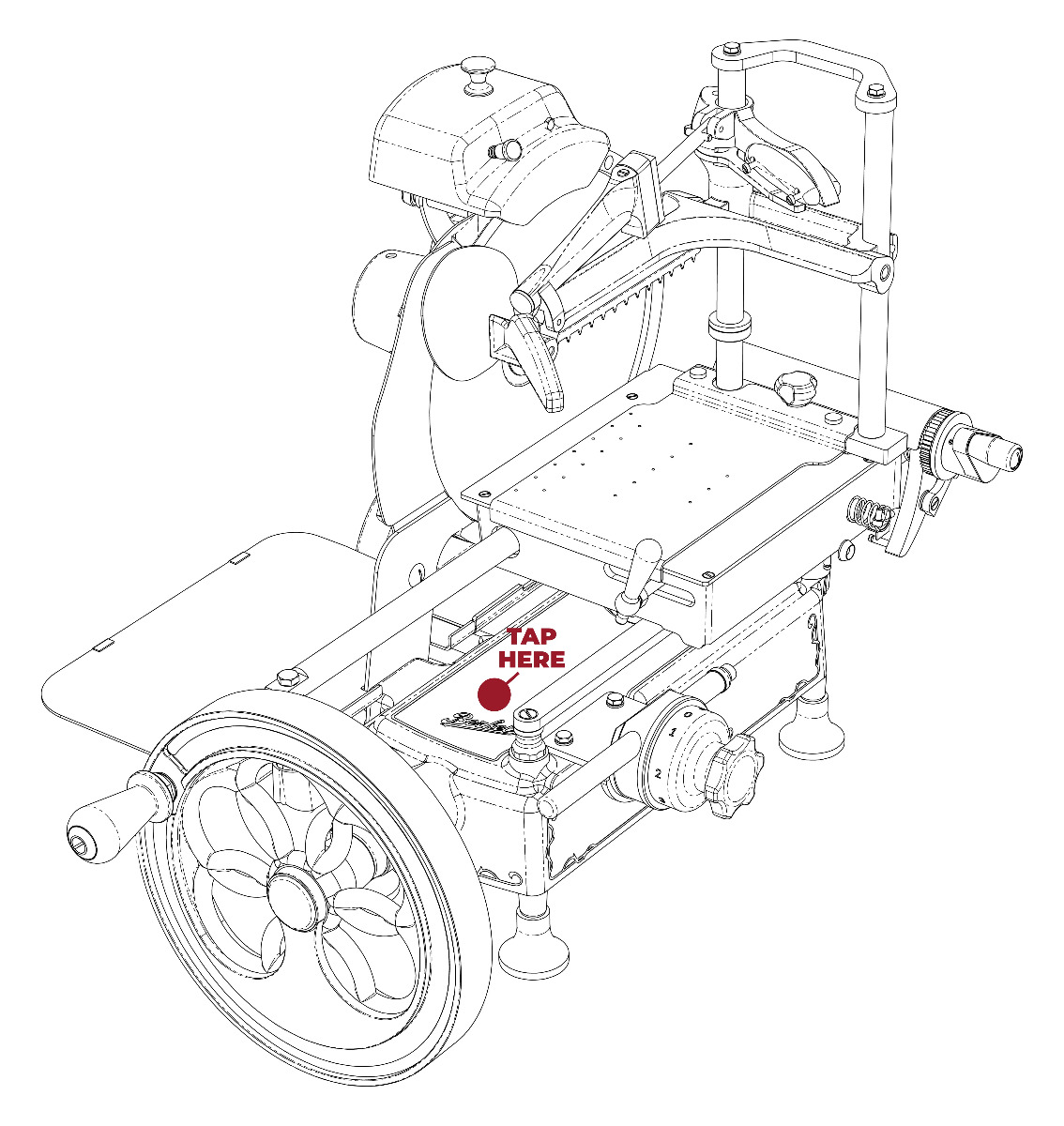
Berkel offers the service of engraving personalised text on a steel plate. The plate is self-adhesive and free-standing. Spaces without curves are usually chosen for the best fitting.
Frequent positioning
RED LINE and HOME LINE ⇒ external motor compartment body, in the parts closest to the feet (less curved)
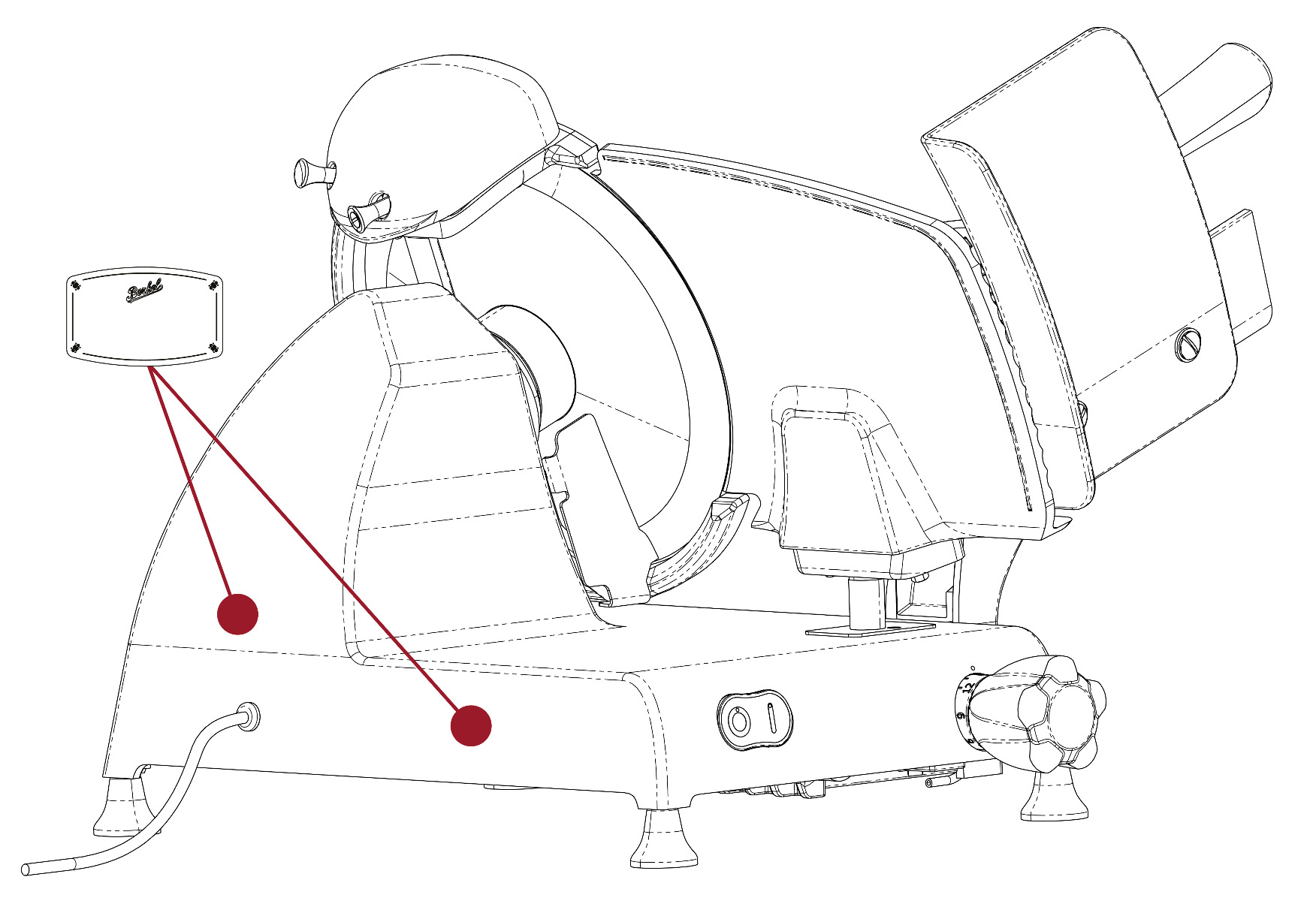
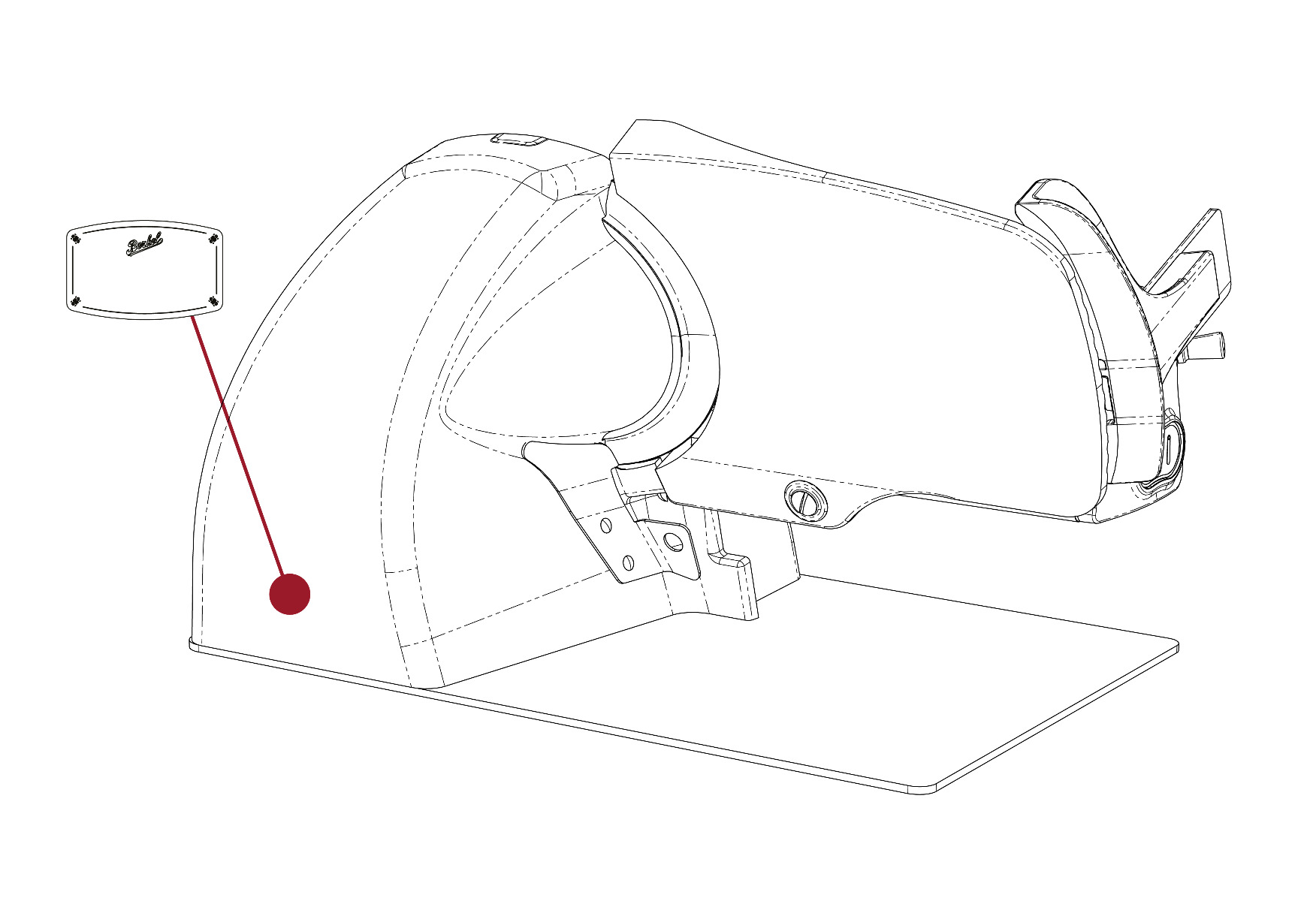
FLYWHEEL ⇒ on the base of the slicer. It is advisable not to apply the plate too close to the logo for better functioning of the fraud prevention NFC tag.
When the operator feels too much resistance when sliding the carriage, the guide bars should be lubricated. It is advisable to lubricate with acid-free synthetic oils (Vaseline oil is recommended) and not with vegetable oils which, once dry, could make the situation worse.
Where to lubricate:
HOME LINE ⇒ lubricate the visible carriage guide bar. See the video for further information.
RED LINE ⇒ lubricate the carriage guide bar under the slicer packaging. See the video for further information.
FLYWHEEL ⇒ Lubricate as follows
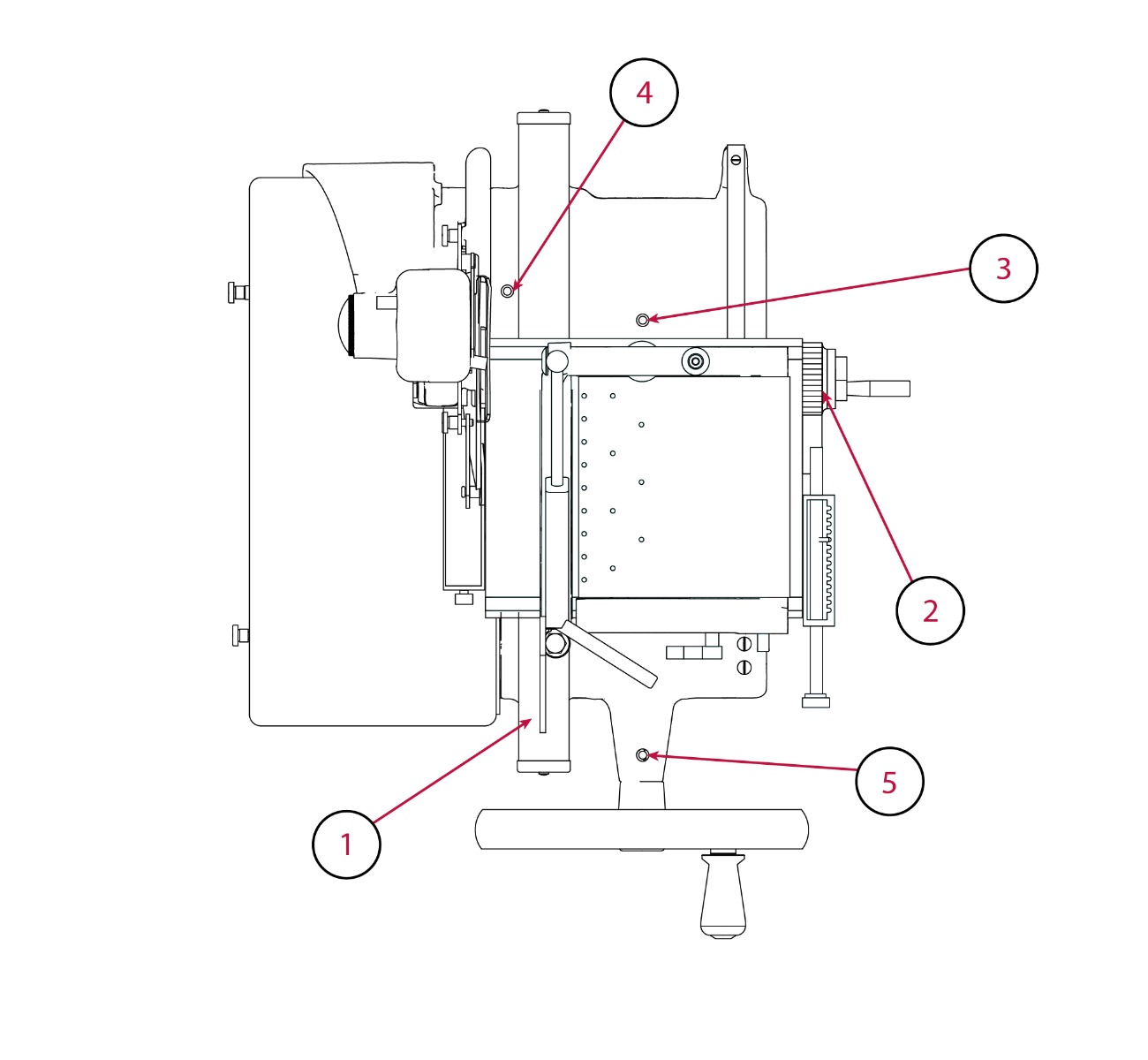

Pour a few drops of oil onto the bar (1) and into the joint of the thickness adjustment knob (2); pour a few drops of oil into the holes (3 and 4); pour a few drops of oil into the joint between flywheel and slicer body (5); briefly operate the flywheel.
All electric slicers are equipped with a standard cable with EU plug; if you need a different plug, please contact us here
HOME LINE
We recommend continuous use of the slice deflector, metal and magnetic deflector already present in the package. This tool allows the optimal detachment of the slice from the blade and prevents the accumulation of residues in the back of the blade. To apply it, match the two holes in the deflector to the two pins/screws in the slice receiving area.
We recommend the purchase of the blade extractor for complete cleaning of the back of the blade and to maintain a high quality of cut. The sharpener is recommended when you notice that the slices are not optimal. The blade extractor, sharpener, cover and cutting board are not included in the Home line packages but are available separately for purchase.
RED LINE
includes the sharpener; the extractor is not necessary due to the large spaces for cleaning at the back of the blade of this model. Cutting board and cover are not included but are available separately for purchase.
Make sure that the slicer is stable and positioned flat. If the product is cured and hard, it is advisable to move the carriage slowly to slice. If the edge of the blade is altered, sharpen it as described in the manual supplied with each slicer.
Red Line is equipped with a CE safety lock that prevents the removal of the meat table in the open-blade position. Before moving the lever that allows you to remove it, make sure that the slice thickness adjustment knob is on “0” and that the meat table is completely back towards that knob.
Berkel slicers are equipped with a deflector, which allows a better detachment of the slice from the blade and guarantees the best performance of the machine. In addition, with less residue on the blade, the cleaning operation is greatly facilitated. We recommend to always use it, fixing it in its position, and to remove it only for cleaning.
If small rust spots have appeared on the edge of the blade, you can remove them by sharpening. To prevent this, you should always dry the blade after cleaning it so that moisture does not favor the growth of rust.
Always unplug the power cord before cleaning. You can clean the accessible surfaces of the machine with a sponge dampened with neutral soap, denatured alcohol or white vinegar diluted with water. If you have a Berkel Vacuum, you can remove the drip tray and wash it separately in the dishwasher.
Rolls and bags: If you buy rolls, you can cut only the necessary part and save plastic Pre-cut bags, on the other hand, save time and are ready for use. Make sure that the length of the bag to be used is at least 8 cm longer than the food to be stored and allow an additional 2 cm for each time the bag is used again. To facilitate sealing, we recommend lined/embossed bags, with the lines facing upwards and therefore closer to the sealing bar.
Containers: ideal for storing products that are used frequently, such as dry and fragile foods; powdered foods; fruit and vegetables whether fresh, blended or puréed. Fill the container leaving at least 3 cm of space from the top edge of the container and place the lid on the container. Remember that marinating is only possible with the specific square container (BKL001073), the only one of the containers with handles for perfect closure.
Caution: food that is too crumbly may become damaged. With foods containing liquids, stop the minivac suction before they are sucked in. This problem is not posed with the Berkel vacuum and its “humid” function. For further information refer to the manual
We strongly recommend hand washing in warm water to ensure product integrity and durability. In any case we suggest drying the knife after each washing. Do not use abrasive fabrics or sponges. Do not wash in the dishwasher; sudden changes in temperature could damage the handles and the logo; rubbing of the tablewear together could damage the blades.
Dear Customer,
If you purchased your product from a retailer, please contact the retailer directly for returns.
You may exercise your right of withdrawal for purchases made on our website within 14 days from the date you received the products.
Please note that, in order to correctly exercise your right of withdrawal, you must return the products perfectly intact and preserved, in their original packaging, with no missing parts.
You can access the return form via the link provided here, or alternatively send an email to technical@berkelinternational.com.
Further information here
If you purchased your product from a retailer, please contact the retailer to return the product.
If you bought your product from theberkelworld.com, please keep the packaging, write and send a photo using the return form you will find there.
or write an e-mail to technical@berkelinternational.com specifying the product you wish to return or exchange for another product (if present, also indicate the product code and serial number). You will receive return instructions in response. All products purchased must be returned intact, PERFECTLY PRESERVED and in their original packaging, without any defects. The replacement or return will be borne by Van Berkel International only if the product is non-compliant or defective. If the product received is considered non-compliant and not damaged by the customer, it will be fully refunded to the customer or replaced with a new product as indicated by the customer.
Further information here
At theberkelworld.com, shipping is free of charge to all EU countries for orders over €150.00. Shipping costs are charged to the customer for all orders under this amount.
For information on the shipping costs, we recommend that you simulate an order by entering the destination address: before payment, you will see any additional cost for shipping to the destination country.
Deliveries are made on working days, from Monday to Friday. No deliveries on holidays. Delivery within 6 working days after receipt of payment. For more exclusive products such as flywheel slicers, delivery times may vary and will be communicated after payment has been received. We will send you an email when your items are shipped. Shipments to Russia are not permitted.
We will send you an email when your items are shipped, with a tracking link to your shipment.
Theberkelworld.com accepts payments via bank transfer, PayPal or credit card.
Register with theberkelworld.com to view your personal shopping information, check the status of your orders and link to the tracking link for your package.
Some promotions may be restricted to registered customers only. To register, fill out this form
You cannot reserve a product but we recommend that you sign up to the “Notify me when this product is available” program. You will find a dedicated button on each page of products that are temporarily out of stock.
theberkelworld.com allows you to place orders as a private customer or as a company. If you have a VAT number, simply enter it. If you qualify for VAT exemption as a non-Italian European company, the tax will be removed automatically at checkout.
The checkout system only recognises and validates VAT numbers registered in the European Community Vies register. If your VAT number is not recognised, please send us an email at info@berkelinternational.com with all your billing details. We will reply with instructions on how to complete your order.
Why should I register my Berkel product?
By registering your product, you can access a dedicated personal area where you can consult the user manual and technical data sheet of your product at any time.
Is product registration required to activate the warranty?
No. The legal warranty of the product is valid even without registration. Registering your product is not required to activate the warranty, but it allows you to always have the dedicated documentation for your product available.
Do I need to download an app to use the service?
No. You can access the service directly from your smartphone, tablet or computer without installing any application.
What will I find in my Berkel Lover account?
You will find the user manual, technical data sheet and information related to your registered products.
How can I register my Berkel product?
You can register your product by scanning the QR code available on the machine or by using the registration widget available on the Berkel website.
Where can I find the serial number of my product?
The serial number is shown on the product identification label. You will be asked to enter it during the registration process.
Is product registration mandatory?
Registration is not mandatory, but it allows you to access the dedicated documentation for your product, always available in your personal area.
Is product registration required to activate the warranty?
No. The legal warranty of the product is valid even without registration. Registering your product is not required to activate the warranty, but it allows you to always have the dedicated documentation for your product available.
Can I register multiple products with the same account?
Yes, you can associate multiple Berkel products with the same personal account.
What happens if I cannot register my product?
Make sure you have entered the serial number correctly. If the issue persists, contact Berkel Customer Service.
What is a Berkel Lover account?
The Berkel Lover account is your personal area dedicated to the Berkel world, where you can manage your registered products and consult the available documentation.
What benefits does the Berkel Lover account offer?
By registering your product, you will be able to consult the user manual and technical data sheet directly from your personal area.
Can I edit my account details?
Yes, you can update your personal information at any time by accessing your private area.
I forgot my password. How can I recover it?
You can use the "Forgot password" function available on the login page.
What information will I find in my personal area?
Within your account, you will find the user manual and technical data sheet of the registered product.
Can I download the manual of my product?
Yes, the user manual will be available directly in your personal area.
Can I consult the technical data sheet of my product?
Yes, the technical data sheet of the registered product will be available in your personal area.
Can I access my product information at any time?
Yes, all information associated with your registered products will always be available in your account.
Do I need to download an app?
No. The service is accessible via a link and does not require the installation of a traditional app. You can add the link directly to your smartphone or tablet home screen for quick access to the service, without taking up storage space like a traditional app.
Can I use the platform from any device?
Yes, you can access your account from a smartphone, tablet or computer.
Is an internet connection required?
Yes, an internet connection is required to access the available content.
How can I contact Berkel support?
You can contact Customer Service through the channels indicated on the official Berkel website (or by clicking here).
Can I request assistance for a registered product?
Yes. Having a registered product makes it easier to identify the model and provide you with the most appropriate support.
Are my data safe?
Yes, personal data is processed in compliance with current privacy regulations and used exclusively for managing the services connected to the account.
Why can't I see the price while configuring the product?
Each configuration is reviewed by our team before the quotation is sent, allowing us to provide you with an accurate and reliable offer, together with updated production and delivery times.
Can I purchase the product directly online?
No. The configurator does not allow direct online purchases. Once you have completed your configuration, the Berkel team will review your request and send you a quotation. After the order has been confirmed, your slicer will be put into production.
How does the configurator work?
The configurator allows you to customize the appearance of your flywheel slicer by selecting from the available customization options. Once you have completed the configuration, you will receive a personalized quotation.
Can I purchase the product directly online?
No. The configurator does not allow direct online purchases. Once you have completed your configuration, the Berkel team will review your request and send you a quotation. After the order has been confirmed, your slicer will be put into production.
Is the configuration I created already an order?
No. Submitting your configuration is only a quotation request and does not constitute a binding order.
Can I modify my configuration after submitting it?
Yes. You can request changes before confirming the quotation.
How long does it take to receive a quotation?
Within 5 working days.
Does the quotation have an expiration date?
Yes. The quotation is valid for 30 days.
Is the quotation free of charge?
Yes. Requesting a quotation is completely free and without obligation.
Can I request multiple configurations at the same time?
Yes. You can submit multiple requests to compare different customization options.
Is it possible to configure other flywheel slicer models?
Yes. For more information, please complete the contact form and our Customer Service team will be happy to assist you.
Can I request a custom solution that is not available in the configurator?
Yes, but only for colors. Enter the desired RAL code in the dedicated Custom RAL field during the configuration process.
What happens after I submit a request for a custom RAL color?
Our team of experts will evaluate the feasibility of your customization request.
If your request cannot be fulfilled, we will propose an alternative solution that best meets your requirements.
Is it possible to request samples or prototypes?
Physical samples are not available. For the customization options available in the configurator, a digital rendering is included with your request. After submitting your request, you will receive both the rendering and a copy of your submission by email.
What are the production times?
Production and delivery times will be specified in the quotation.
Is there a minimum order quantity?
No minimum order quantity is required. Production times may vary depending on the quantity requested.
Do you ship internationally?
Yes. Shipping methods and costs will be specified in the quotation.
Can I request an urgent delivery?
Yes. Please indicate your requirement when submitting your request, and we will evaluate its feasibility.
How can I check the status of my request?
You can contact Customer Service and provide your request reference number.
Who can I contact for support with the configurator?
If you need assistance while using the configurator, you can contact our Customer Service team.
How will my personal data be processed?
Your personal data will be used exclusively to manage your quotation request and in accordance with applicable privacy regulations.